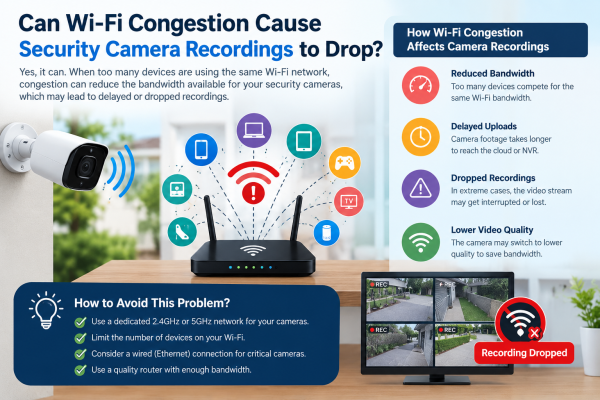
Security cameras play an important role in protecting homes, shops, offices, and commercial properties. However, some users experience missing recordings, interrupted live views, delayed notifications, or gaps in video footage. One possible reason is Wi-Fi congestion.
Wi-Fi congestion happens when many devices share the same wireless network, reducing bandwidth and increasing delays. If your security camera relies on Wi-Fi to transmit video, congestion can affect its performance. However, the exact impact depends on the camera's recording method, network setup, and signal strength.
In this blog, we will explain how Wi-Fi congestion can affect CCTV recordings. We will cover common warning signs. We will also share practical ways to prevent recording interruptions.
1. How Does Wi-Fi Congestion Affect Security Cameras?
Wi-Fi networks connect devices such as smartphones, laptops, smart TVs, gaming consoles, and security cameras. When too many devices use the same network simultaneously, the available wireless capacity can become limited.
Security cameras continuously transmit video when recording to a network video recorder (NVR), network storage, or cloud service. If the wireless network cannot handle the video stream reliably, the camera may experience:
-
Interrupted video transmission
-
Delayed live viewing on a mobile phone
-
Missing sections in cloud recordings
-
Delayed motion detection notifications
-
Temporary camera disconnections
-
Reduced video quality, depending on the camera and application
These problems are more likely when several cameras stream high-resolution video over a crowded Wi-Fi network.
2. Does Wi-Fi Congestion Always Cause Missing Recordings?
No. Wi-Fi congestion does not automatically mean that a security camera will stop recording.
The impact depends on where the video is stored.
Local recording: Cameras that record to a microSD card may keep recording when Wi‑Fi is unstable. This works if the camera stays powered and the storage works properly.
NVR recording: A Wi‑Fi camera sends footage to a network video recorder. Recording gaps can occur if the wireless connection fails often. The recorder may not be able to recover the missing video.
Cloud recording: Cameras that depend on cloud storage generally require a working internet connection to upload footage. Network congestion or an internet outage may interrupt cloud recordings.
Understanding your camera's recording method is essential before deciding whether Wi-Fi congestion is the actual cause.
3. Common Signs of Wi-Fi Congestion in CCTV Systems
Look for these warning signs when troubleshooting a security camera:
Delayed Live Video
If the live view loads slowly or often freezes, the wireless network may be overloaded or have interference.
Missing Video Clips
If cloud or NVR recordings contain gaps, check whether the camera lost its connection during those periods. Also inspect storage capacity, recording schedules, and system logs.
Frequent Camera Disconnections
A camera that keeps going offline and reconnecting may have weak Wi-Fi, interference, network congestion, or power issues.
Poor Video Quality
Some camera applications automatically reduce streaming quality when network conditions deteriorate. Blurry or pixelated footage may indicate transmission problems. Camera settings, lighting, and lens condition can also affect image quality.
4. What Causes Wi-Fi Congestion in Homes and Businesses?
Several factors can make a CCTV network unreliable.
-
Too many connected devices: Smartphones, smart TVs, computers, and cameras compete for wireless airtime.
-
Multiple high-resolution cameras: Several cameras transmitting high-bitrate video can put significant pressure on a Wi-Fi network.
-
Weak signal strength: Thick walls, metal doors, long distances, and multiple floors can weaken the connection.
-
Wireless interference: Nearby Wi-Fi networks and some electronic devices can interfere with wireless communication.
-
Router limitations: Older routers or poorly positioned access points may struggle with many connected devices.
-
Internet upload limits: Cloud cameras may not work well if upload speed is too low, even with strong Wi‑Fi.
Remember that local Wi-Fi congestion and slow internet are different problems, although both can affect remote camera viewing.
5. How to Prevent CCTV Recording Drops Caused by Wi-Fi Problems
You can improve your security camera system's reliability by following these steps.
Use a Separate or Less Congested Network
Where practical, connect security cameras to a dedicated Wi-Fi network or access point. This can reduce competition with everyday devices, provided the network has enough capacity and is configured correctly.
Improve Wi-Fi Coverage
Place your router or access point closer to the cameras. For larger homes, shops, and offices, extra access points can provide more reliable coverage than one router.
Choose the Appropriate Wi-Fi Band
The 2.4 GHz band generally offers better range through walls, while 5 GHz can provide higher speeds over shorter distances. Select a band supported by your camera and suitable for its installation location.
Reduce Unnecessary Video Bandwidth
Review resolution, frame rate, and bitrate settings. Adjusting them to an appropriate level may reduce network demand, but avoid sacrificing essential image detail for identification.
Use Wired Connections Where Possible
For cameras in critical areas, use wired Ethernet or a PoE camera system. This reduces reliance on Wi-Fi. A wired camera system is often a good choice for businesses that require consistent recording.
Check Local Storage and NVR Settings
Use a compatible, reliable microSD card or properly configured NVR where supported. Check recording schedules, storage capacity, overwrite settings, and playback history to confirm that footage is being saved correctly.
Keep Firmware Updated
Install manufacturer-approved firmware updates and review router settings. Updates may improve stability, security, and device compatibility.
6. How to Identify Whether Wi-Fi Congestion Is the Real Problem
Before replacing your camera, follow a simple troubleshooting process:
-
Check the camera's online status and connection history.
-
Compare the timestamps of missing recordings with any network disconnections.
-
Test the camera near the router to see whether its performance improves.
-
Check whether other devices experience slow connections at the same time.
-
Review the router's connected-device list and available bandwidth.
-
Inspect the camera's storage, recording schedule, power supply, and NVR settings.
-
Test a wired connection, if supported, to help isolate wireless problems.
If the camera records nonstop to local storage but remote viewing freezes, the problem is likely in the network.
7. Are Wired CCTV Cameras Better Than Wi-Fi Cameras?
Both systems can provide effective security, but they suit different requirements.
Wi-Fi cameras are often convenient for homes and smaller installations where running cables is difficult. They can also offer mobile monitoring and local storage, depending on the model.
Wired CCTV cameras generally provide a more predictable connection because video transmission does not depend on wireless signal quality. IP cameras using Power over Ethernet (PoE) can receive power and transmit data through a single Ethernet cable.
For shops, offices, warehouses, and other places, continuous recording can be important. A well-designed wired system may work better there. Wi-Fi cameras can still work reliably when coverage, bandwidth, and storage are configured correctly.
Conclusion
Wi‑Fi congestion can make your security camera video cut out.
It can delay live viewing.
It can also cause missed recordings when the wireless connection is unreliable. However, congestion is only one possible cause. Weak signals, internet upload limitations, power interruptions, storage problems, and incorrect recording settings can produce similar symptoms.
To improve CCTV reliability, optimise your Wi-Fi coverage, manage network traffic, check recording storage, and consider wired connections for critical surveillance areas. Most importantly, check where your footage is saved. Review recording history often. Do not assume a camera records just because live view works.
For homes, shops, and offices in Ghaziabad, Indirapuram, Noida, and Delhi NCR, the right CCTV system helps. Proper setup keeps surveillance reliable and reduces recording gaps.
Contact us today to find the perfect CCTV solution for your property.