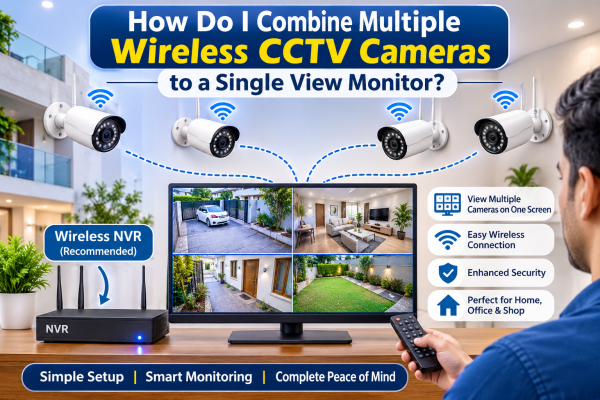
Installing many wireless CCTV cameras helps you watch different areas of your home, office, shop, or business property. However, managing several cameras individually can become inconvenient. A common question among CCTV users is: How do I combine many wireless CCTV cameras into one monitor view?
The good news is that you can connect multiple wireless CCTV cameras to one monitor and view all camera feeds on a single screen. With a compatible Network Video Recorder (NVR), wireless camera system, or monitoring software, you can set up centralised surveillance.
In this guide, we explain ways to connect many wireless CCTV cameras to one monitor.
We also cover required equipment and key points to check before installation.
1. Use a Wireless NVR System
One of the easiest and most reliable methods is to use a wireless NVR (Network Video Recorder).
A wireless NVR lets many compatible IP cameras connect to one central recording device.
The cameras connect using Wi‑Fi or a dedicated wireless network. The NVR combines the camera feeds and displays them on a single monitor.
How to connect wireless CCTV cameras using an NVR:
-
Install your wireless CCTV cameras at the required locations.
-
Connect the NVR to your router or network, if required by the system.
-
Connect the NVR to a monitor or TV using an HDMI or VGA cable.
-
Power on the cameras and NVR.
-
Pair or add each camera through the NVR settings.
-
Configure the display layout to view multiple cameras simultaneously.
Once the setup is complete, you can view different camera feeds on one monitor. Use split-screen or multi-channel display options.
2. Connect Cameras Through a Wi-Fi Network
Another option is to connect multiple wireless IP cameras to the same Wi-Fi network.
Many modern Wi-Fi CCTV cameras support network-based viewing through compatible applications or video management software (VMS).
Steps to connect cameras through Wi-Fi:
-
Connect each camera to the same Wi-Fi network.
-
Install the compatible CCTV viewing application or VMS on a computer.
-
Add each camera using its IP address, ONVIF compatibility, or supported device discovery method.
-
Configure the software to display multiple camera feeds.
-
Connect your computer to a monitor using HDMI or another supported display connection.
This method is useful when you want to monitor multiple cameras without purchasing a separate NVR. However, compatibility between cameras and software is important.
3. Use CCTV Monitoring Software on a Computer
If your wireless CCTV cameras support network streaming, you can use CCTV monitoring software. It can show many camera feeds on one computer screen.
Video Management Software (VMS) helps organize, monitor, and manage multiple cameras from a centralized interface.
Some software solutions support:
-
Multi-camera live viewing.
-
Split-screen layouts.
-
Camera grouping and management.
-
Motion detection notifications.
-
Recording and playback, depending on the software and camera compatibility.
This option is very useful for offices, retail shops, warehouses, and other places with many cameras to monitor together.
4. Use a Smart TV or Android TV
Some wireless CCTV cameras support viewing through Android TV applications or compatible smart TV platforms.
If your camera manufacturer provides a supported TV application, you may be able to log in and view multiple cameras directly on the television.
Alternatively, you can connect a computer or compatible streaming device to the TV and display the camera monitoring software.
Before choosing this method, check whether your camera application supports multi-camera viewing on your TV.
5. How Many Wireless CCTV Cameras Can Be Connected to One Monitor?
The number of cameras you can view on one monitor depends on your recorder.
It also depends on your software, network capacity, and camera compatibility.
Common multi-channel configurations include:
-
4-camera setup: Suitable for small homes and shops.
-
8-camera setup: Useful for medium-sized homes and offices.
-
16-camera setup: Suitable for larger commercial properties.
-
32-camera setup: Useful for warehouses, factories, and larger surveillance systems.
Remember that the number of cameras an NVR supports may not match the number it can show at once. Check both the input channel capacity and the live-view display specifications.
6. Important Things to Check Before Connecting Multiple Wireless Cameras
Before combining multiple wireless CCTV cameras into one monitor, consider the following factors:
1. Camera Compatibility: Ensure that your cameras are compatible with the NVR or monitoring software. ONVIF support can help with interoperability, but it does not guarantee that every feature will work.
2. Wi-Fi Signal Strength: Every wireless camera needs a stable network connection. Weak Wi-Fi signals can cause video delays, disconnections, or poor image quality.
3. Network Bandwidth: Multiple cameras streaming high-resolution video can consume significant network bandwidth. Choose a suitable router and network infrastructure.
-
Monitor Resolution: Use a suitable monitor resolution so multiple camera feeds stay clear and easy to view.
-
Storage Capacity: If you need continuous recording, choose an NVR and hard drive with enough storage.
Make sure it supports your camera count and recording time.
-
Power Supply: Wireless CCTV cameras still need electrical power. This is unless they are designed for battery or solar use.
7. Wireless CCTV Cameras vs Wired CCTV Systems for Multi-Camera Monitoring
Both wired and wireless CCTV systems can display multiple camera feeds on one monitor, but they work differently.
|
Feature |
Wireless CCTV |
Wired CCTV |
|
Camera connection |
Wi-Fi or wireless network |
Cable or network cable |
|
Installation |
Often more flexible |
Requires cable routing |
|
Network dependency |
Wi-Fi quality is important |
Wired connection is more stable |
|
Multi-camera viewing |
Supported with compatible NVR/VMS |
Supported with DVR/NVR |
|
Best suited for |
Flexible installations |
Reliable permanent installations |
The right option depends on your property layout, network conditions, installation requirements, and security needs.
8. Common Problems When Connecting Multiple Wireless CCTV Cameras
Sometimes users experience problems while combining several wireless cameras into one monitoring system.
Here are some common issues and their possible solutions:
-
Camera not appearing on the monitor: Check camera pairing, network settings, and NVR compatibility.
-
Video buffering or lag: Improve Wi-Fi coverage and check network bandwidth.
-
Some cameras disconnect frequently: Check signal strength and router capacity.
-
Unable to add cameras from different brands: Check ONVIF support and protocol compatibility.
-
Only one camera is visible: Check the monitor's split-screen settings and NVR display configuration.
If problems continue, a professional CCTV technician can inspect the network and system configuration.
Conclusion
Combining multiple wireless CCTV cameras into a single-view monitor is possible with the right equipment and configuration. A compatible wireless NVR is generally the most convenient option, while VMS software provides flexibility for computer-based monitoring.
Whether you want to monitor your home, office, shop, or warehouse, a central CCTV system helps.
It lets you watch different areas from one screen.
If you plan to install many wireless CCTV cameras, choose compatible models. Ensure strong network coverage. Select a suitable NVR or monitoring solution.
Nagbibigay ang GR CCTV Solutions ng mga solusyon sa CCTV camera para sa bahay, opisina, tindahan, at negosyo.
Serbisyo ito sa Ghaziabad, Indirapuram, Noida, at Delhi NCR. Choose the right surveillance setup for better monitoring and peace of mind.
Contact us today to find the perfect CCTV solution for your property.